EMAIL US
sales@scanneroptics.com
In laser welding systems, the protective lens shields the F-theta lens from spatter, dust, and airborne contaminants. Although it is small and often overlooked, it directly affects beam transmission efficiency, process stability, and weld quality.
Regular cleaning and timely replacement of the protective lens help keep system performance stable over time. This also reduces unnecessary maintenance costs. It protects the internal optical assembly from damage.
During the laser welding process, high-temperature operation inevitably generates welding spatter, smoke particles, and microscopic contaminants. These particles gradually accumulate on the surface of the protective lens.
If contaminants are not removed promptly, they can reduce optical transmittance, affect beam quality, and eventually lead to unstable laser output. In more severe cases, this may result in coating damage, increased welding spatter, poor weld bead formation, or even permanent damage to internal optical components.
Regular maintenance is therefore essential for maintaining stable processing performance and extending the service life of the entire optical system.
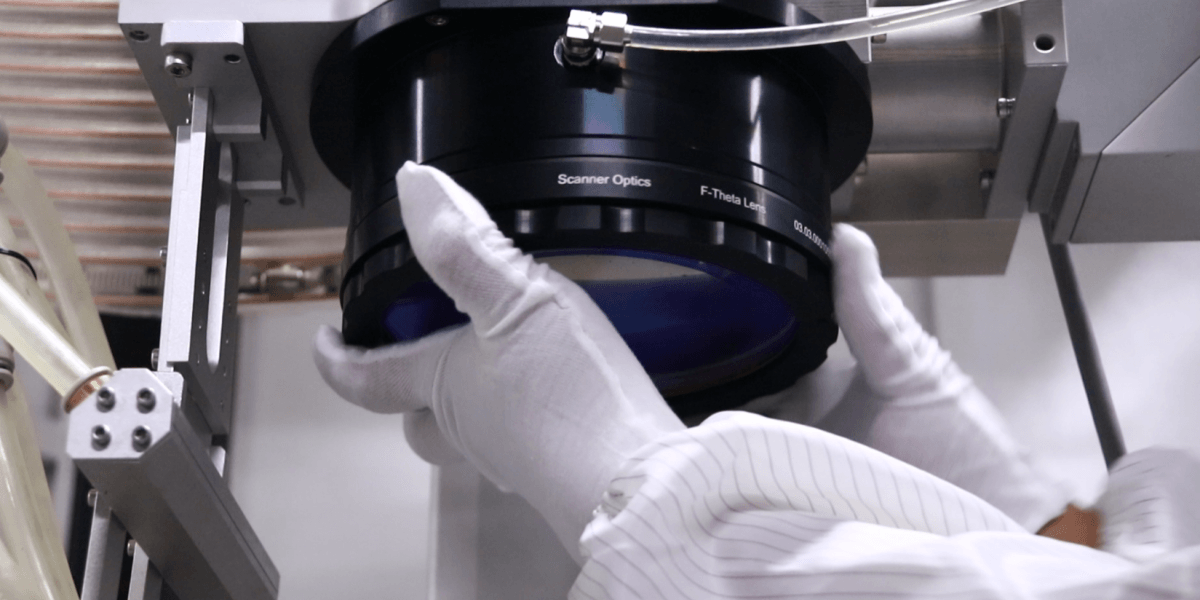
It is recommended to inspect the protective lens after each procesing cycle, especially in high-power or continuous welding applications.
If visible dust, spatter deposits, stains, or other contaminants are found on the lens surface, cleaning should be performed immediately. Delaying maintenance allows contamination to accumulate and increases the difficulty of cleaning.
Direct contact with the lens surface using bare hands must always be avoided. Skin oils can significantly reduce optical transmittance and accelerate coating degradation.
Before cleaning, prepare a clean work environment along with cleanroom gloves, lint-free wipes, and anhydrous alcohol.
Wear cleanroom gloves throughout the cleaning process and handle the lens only by its edges to avoid contaminating the optical surface.
Use a lint-free wipe lightly moistened with alcohol to gently wipe the lens surface in one direction. Avoid back-and-forth wiping, as trapped particles may scratch the optical coating.
If necessary, repeat the cleaning process several times until the lens surface is completely clean.
Apply only gentle pressure during cleaning. Excessive force may damage the coating layer and affect lens performance.
Watch the video for a step-by-step guide
Cleaning is only effective for removable surface contamination.
If the protective lens shows visible scratches, dents, coating peeling, burn marks, or permanent contamination that cannot be removed through normal cleaning, replacement is necessary.
A damaged protective lens can lead to increased welding spatter, unstable beam transmission, reduced welding consistency, and lower processing quality.
More importantly, continued use of a damaged protective lens may expose the internal optical system to contamination risks and lead to higher repair costs.
The protective lens should therefore be replaced immediately once physical damage is detected.
Before beginning the repacement process, prepare a new protective lens, cleanroom gloves, lint-free wipes, and anhydrous alcohol. Wearing ESD protective clothing is also recommended to further reduce contamination risks.
For safety, the laser system must be completely powered down before maintence. Nearby fans, air conditioners, and ventilation equipment should also be turned off to minimize airborne dust interference.
First, rotate the lens cap counterclockwise to remove the protective lens housing. Extra care should be taken during this step to avoid touching or scratching the internal optical lens.
Next, remove the retaining ring and carefully take out the old protective lens. In most cases, accumulated welding spatter and contamination residues will be clearly visible on the lens surface.
Then, remove the protective film from the new protective lens and handle it only by the edges while carefully inspecting both optical surfaces.
If necessary, clean the lens using the one-direction wiping method described above.
Once the lens is confirmed to be clean, place it securely into the housing and ensure it is installed evenly and firmly.
Before reinstalling the assembly, inspect the internal optical surface to ensure it is free from dust or contamination.
Finally, reinstall the protective lens assembly by tightening it clockwise until securely fixed in place.
Effective protective lens maintenance relies on three key practices: regular inspection, proper cleaning, and timely replacement whenever damage is detected.
Following these principles can effectively reduce unexpected downtime, lower replacement costs, and maintain stable welding performance over the long term.
Although protective lens maintenance is relatively simple, it remains a critical part of high power laser welding system upkeep.
Proper cleaning and replacement practices can significantly improve optical performance, extend component lifespan, and ensure stable, reliable welding quality.
By establishing a proactive preventive maintenance routine, manufacturers can maximize equipment efficiency while minimizing long-term operational costs.
 zh-CN
zh-CN
 English
  日本語
日本語  한국어
한국어  français
  Deutsch
  Español
  italiano
  русский
  português
  tiếng việt